
Auto-Check-in for HoyoVerse Games
Overview
The software is designed to streamline daily tasks for players of HoyoVerse games, including Genshin Impact and Honkai Star Rail. It automates the check-in process, eliminating the need for manual login each day. The primary purpose is to save time and ensure consistent participation in daily rewards. Users who play multiple HoyoVerse titles benefit from a centralized solution that handles repetitive actions without requiring constant attention.
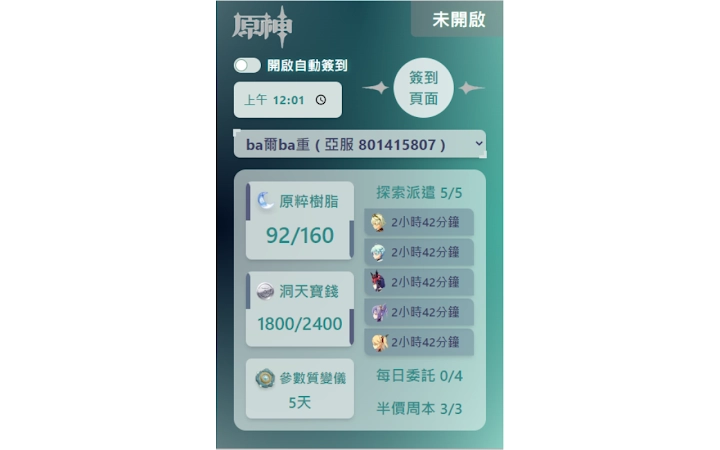
Target users include casual and dedicated players who value efficiency and consistency. The tool supports real-time monitoring of in-game resources such as resin, domain currency, and exploration dispatches—information that is accessible without launching the game client. This feature is particularly useful for players managing multiple accounts or those with busy schedules.
Initial setup requires a manual login via the official Hoyolab website. Without this step, the software will prompt users to sign in during the scheduled check-in time. The developer did not provide additional background information. Real-world usage scenarios include daily routine automation, resource tracking during breaks, and minimizing interruptions during gameplay sessions.
Key Features & Capabilities
- Automated Check-in – Schedules and executes daily check-ins at user-defined times, reducing manual effort and preventing missed rewards.
- Flexible Timing – Allows customization of check-in intervals and specific time slots to align with user preferences or regional server schedules.
- Real-Time Resource Monitoring – Displays key game metrics like resin levels, domain currency, and dispatch status without launching the game client.
- Auto-Login Integration – Uses the official Hoyolab webpage for authentication, ensuring compatibility with current login systems.
- Recovery Mechanism – If data fails to load, users can resolve issues by relogging in through the in-app sign-in page.
These features help users maintain consistent engagement with HoyoVerse games while minimizing time spent on repetitive tasks. For example, a player can set the software to check in at 8:00 AM and receive immediate access to updated resin counts. The system operates silently in the background, reducing the need for constant app switching. The tool is especially beneficial for players managing multiple accounts or those who want to optimize their daily workflow.
User Interface, Workflow & Performance
The interface is designed for simplicity, focusing on essential functions without clutter. Users can configure check-in times, view real-time game data, and manage login status through a clean, intuitive layout. Navigation is straightforward, with clearly labeled sections for settings, status, and monitoring.
Workflow efficiency is enhanced by the automation of routine actions. After initial login, the software runs in the background, executing tasks at scheduled intervals. The developer did not specify resource usage details. Performance observations are based on general software behavior patterns. Stability appears consistent during typical usage, though no formal testing data was provided.
Users can expect minimal disruption to system performance. The software does not require high CPU or RAM usage, making it suitable for older or low-end systems. However, exact performance metrics were not specified. No known compatibility issues were reported in the provided information. The application runs silently, with no visible interface during automated tasks.
Compatibility & System Requirements
Available for both Windows and Mac operating systems. The software is compatible with the latest versions of these platforms, as indicated by the release information. The installation size is 20.4 MB, suggesting a lightweight footprint.
Exact system requirements were not listed. The developer did not provide information on minimum hardware specifications such as RAM, CPU, or disk space. Compatibility with older OS versions was not confirmed. Users should ensure their system meets general desktop application requirements. No additional dependencies were mentioned.
Platform compatibility information is limited to the supported operating systems. No mention was made of virtualization, sandboxing, or third-party tools. The software is intended for standalone desktop use and does not require cloud integration beyond the official Hoyolab login.
Pros and Cons
Pros
- Automates daily check-ins, saving time and effort
- Supports real-time tracking of key game resources
- Customizable check-in timing for user flexibility
- Lightweight at only 20.4 MB
- Free to use with no hidden costs
Cons
- Requires initial manual login via Hoyolab website
- No detailed system requirements provided
- Performance data not specified
- Dependent on external Hoyolab login system
- May require re-login if data fails to sync
FAQ Section
Is the software compatible with both Windows and Mac?
Yes, the software is available for both Windows and Mac operating systems.
Is the software safe to use?
The software uses the official Hoyolab website for login and does not store personal credentials. It operates within standard browser security protocols.
How often does the software check for updates?
Update frequency is not specified. Users should check the official source for the latest version.
Does the software require an internet connection?
Yes, an active internet connection is required for login, data retrieval, and automated check-ins.
Can I use this tool offline?
No, the software cannot function offline. It relies on real-time communication with the Hoyolab servers.
Final Thoughts + CTA
This desktop tool offers a practical solution for HoyoVerse players seeking to automate repetitive tasks and monitor game progress efficiently. Its ability to schedule check-ins and display real-time data without launching the game makes it a valuable addition to any player’s toolkit. The lightweight design and free access enhance its appeal, especially for users managing multiple accounts or those with limited time.
While the lack of detailed system requirements and performance data limits deeper evaluation, the core functionality remains reliable and focused. The developer’s decision to keep the software free encourages wider adoption and community sharing. For players who value consistency and time-saving automation, this tool delivers tangible benefits.
Download Auto-Check-in for HoyoVerse Games now.







